LIVE DEMO, RUNNING ON A PODCAST WEBSITE

See every new page reach the search engines

Traffic Boost Indexing tells search engines about new and changed pages the moment you hit publish. Automatically, in the background, on every save. No cron jobs, no copy-pasting URLs into webmaster tools.

Everything below is real. The plugin runs on this website, and the screenshots come from allepodcasts.nl, a Dutch podcast directory that publishes new pages every day.

€25 every six months. For Joomla 5 and 6. Traffic Boost Indexing is a Joomla extension; there is no WordPress version.

Publish. Ping. Get found.

Three steps, and you only do the first one.

1. You publish

Save an article, a category, a tag, a media file or a ZOO item. That is all you do, so keep working as you always have.

2. The plugin pings

The moment content changes, the URL is submitted through the IndexNow protocol, and to Google when Search Console is connected. Queued, retried and rate-limited automatically.

3. Search engines follow

Bing, Yandex, Seznam and friends fetch the page right away instead of waiting days for the next crawl. Fresh content gets found while it is still fresh.

How to set it up

Install the package and open System, Manage, Plugins, then System - Traffic Boost Indexing. On the IndexNow tab, Automatic URL Submission is already on. Leave API Key empty and the plugin creates the key and the verification file for you. Save, and the next article you save is submitted.

The dashboard on a live site

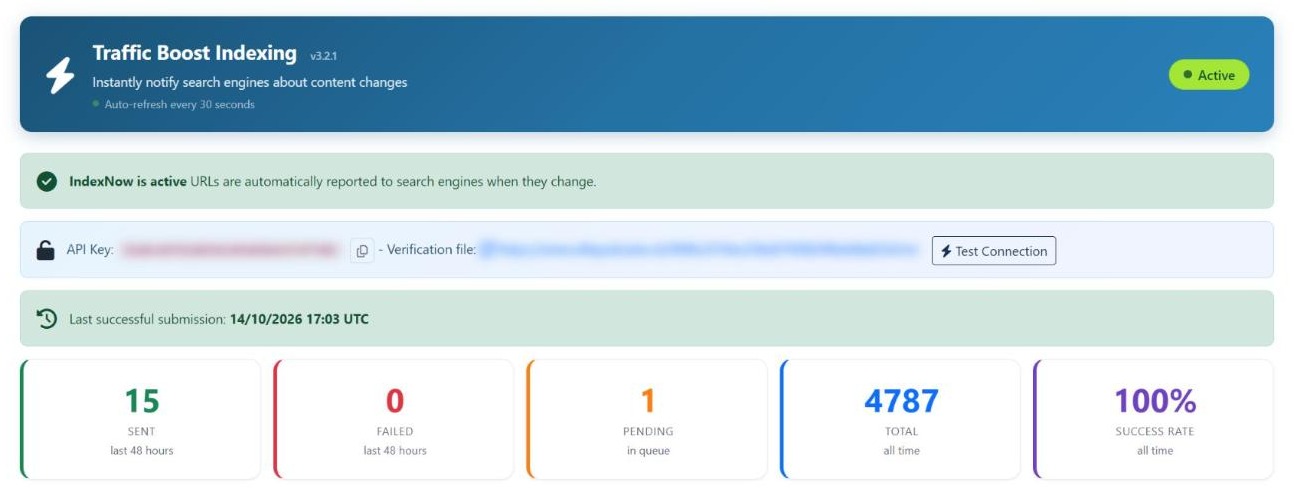
This is the real dashboard of allepodcasts.nl, not a mock-up: 4,787 URLs submitted with a 100% success rate when this screenshot was taken. It shows whether IndexNow is active, your API key with its verification file (blurred here), and what happened in the last 48 hours.

Traffic Boost Indexing dashboard on allepodcasts.nl: IndexNow active, API key and verification file blurred, 4,787 URLs submitted with a 100% success rate

Every submission, tracked per day

The 30-day chart shows exactly when your content was pushed out. One click submits a single URL, your whole sitemap, or downloads the full log as CSV.

Bar chart of daily IndexNow submissions on allepodcasts.nl over the last 30 days
How to set it up

After installation the dashboard appears as a module on the Joomla home dashboard, and as the Dashboard tab in the plugin. Use Submit URL for a single page, Submit sitemap to send every page at once, and Export CSV to download the log.

Your Google results, right in Joomla

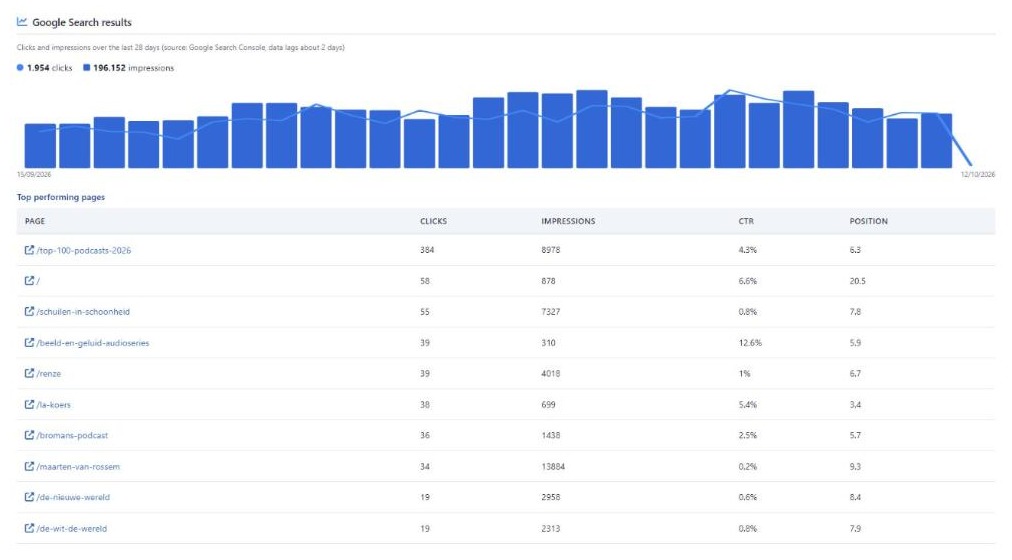
Connect Google Search Console with your own Google account or the shared YOOzeCase connection, and the dashboard shows what your submissions deliver: clicks, impressions and your best pages over the last 28 days.

Below: allepodcasts.nl again. 1,954 clicks and 196,152 impressions in 28 days, with the ten pages that got the most clicks, their click-through rate and their average position.

Google Search results block on allepodcasts.nl: 1,954 clicks and 196,152 impressions in 28 days, with the ten best pages
How to set it up

Open the Google Search Console tab and set Enable GSC integration to Yes. Keep Connection mode on Shared via YOOzeCase, so you need no Google Cloud project of your own. Click Connect to Google, approve access, and choose your property.

Ready to stop waiting for the crawler?

Install it once, and every page you publish from then on is reported to the search engines.

€25 every six months. For Joomla 5 and 6. Traffic Boost Indexing is a Joomla extension; there is no WordPress version.
NEW

Nothing slips through

Some saves never reach the search engines: an import, a page with a publish date in the future, a server that drops the request. The scheduled task picks these up. Every run sends the articles and ZOO items that went live in the last 48 hours without being submitted.

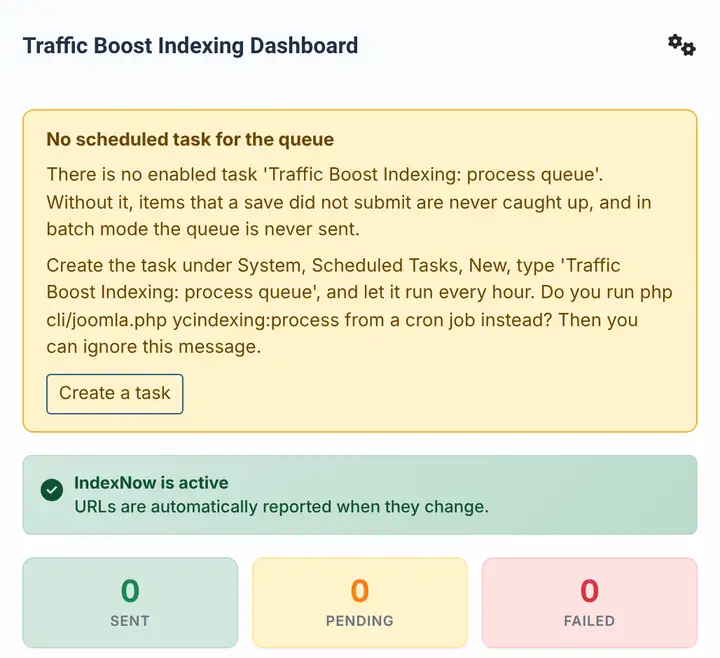
And if that task is missing or has stopped, the dashboard tells you, with a button that takes you straight to the right screen. The screenshot below shows that warning on a fresh test site.

Traffic Boost Indexing dashboard warning that no scheduled task processes the queue, with a Create a task button
How to set it up

Create the task once: System, Scheduled Tasks, New, choose Traffic Boost Indexing: process queue and let it run every hour. Catch up missed items on the Content Types tab is on by default. Prefer a cron job? Run php cli/joomla.php ycindexing:process instead.

More reasons to let the plugin do the work

Canonical URLs, always

Every submission follows your site's own redirects and submits the final address, so ZOO items and categories resolve to their real menu path. Search engines never see a duplicate.

Every content type

Joomla articles, categories, tags and media files, plus ZOO items and ZOO tags. You choose per content type what gets submitted, with filters for exceptions.

Set it and forget it

Runs on Joomla 5 and 6, ships in six languages, and keeps a full log with retry queue. Your editors never notice it, but your visitors find the results.

Updates with your license key

Paste the key from your order email on the License tab and click Activate. Joomla then installs new versions like any other update. Without a key the plugin keeps working; you just do not get updates.

How to set it up

Choose which content is submitted on the Content Types tab: articles, categories, tags, contacts, media and ZOO items each have their own switch. Pages you never want submitted go on the Filters tab under Excluded Paths, one pattern per line, for example /private/*. Pages with a noindex setting are skipped automatically.

Frequently asked questions

Every engine behind the IndexNow protocol is notified instantly, including Bing, Yandex, Seznam.cz and Naver. Connect Google Search Console and your URLs are also submitted to Google, with clicks and impressions reported back on the dashboard.

No. IndexNow works out of the box without any account or sign-up. The Google Search Console connection is optional: use your own Google account or the shared YOOzeCase connection - one click and you are done.

Joomla articles, categories, tags and media files, plus ZOO items and ZOO tags. Every submission uses the canonical URL: the plugin follows your site's own redirects and submits the final address.

No. Submissions run in the background after you save, with a queue, automatic retries and rate limiting. A visitor never waits for a search engine, and the system plugin steps aside on requests it has nothing to do.

If a save does not reach the search engines, the scheduled task Traffic Boost Indexing: process queue sends it on its next run. It also catches up articles and ZOO items that went live in the last 48 hours without being submitted. The dashboard warns you when that task is missing or has stopped.

Joomla 5 and 6 on PHP 8.1 or newer. The interface ships in six languages: English, Dutch, German, French, Spanish and Italian.

Get Traffic Boost Indexing

Every new and changed page reported to the search engines, with a log that shows what happened.

€25 every six months. For Joomla 5 and 6. Traffic Boost Indexing is a Joomla extension; there is no WordPress version.